Photo & video production workspace
Your whole production. One connected flow.
Plan every job, assign the crew, build cloud folders, review photo and video, and send corrections straight into the edit — without stitching five tools together.
Free plan · 2 projects · Review included · No credit card
Fictional sample studio · changes reset when you refresh.
12+ years in production · 3,000+ weddings through our edit room
Get FlowShot
Choose the screen or editor you work in.
Phone · computer · plugins
Connects to the tools already open on your desk.
See how each one connects- Premiere Pro
Comments and exports inside the timeline
-
Google Drive
Project folders from your naming template
-
Dropbox
The same project folders in Dropbox
-
Google Calendar
Shoot dates and crew events on the calendar
-
DeepL
Corrections translated where they were written
The production office for the part of the job that happens after the shutter closes.
Booked, shot, edited, corrected, approved. When there is more than one of you on a job, every one of those steps has to live somewhere both of you can see — not in a chat thread, a spreadsheet and three folders.
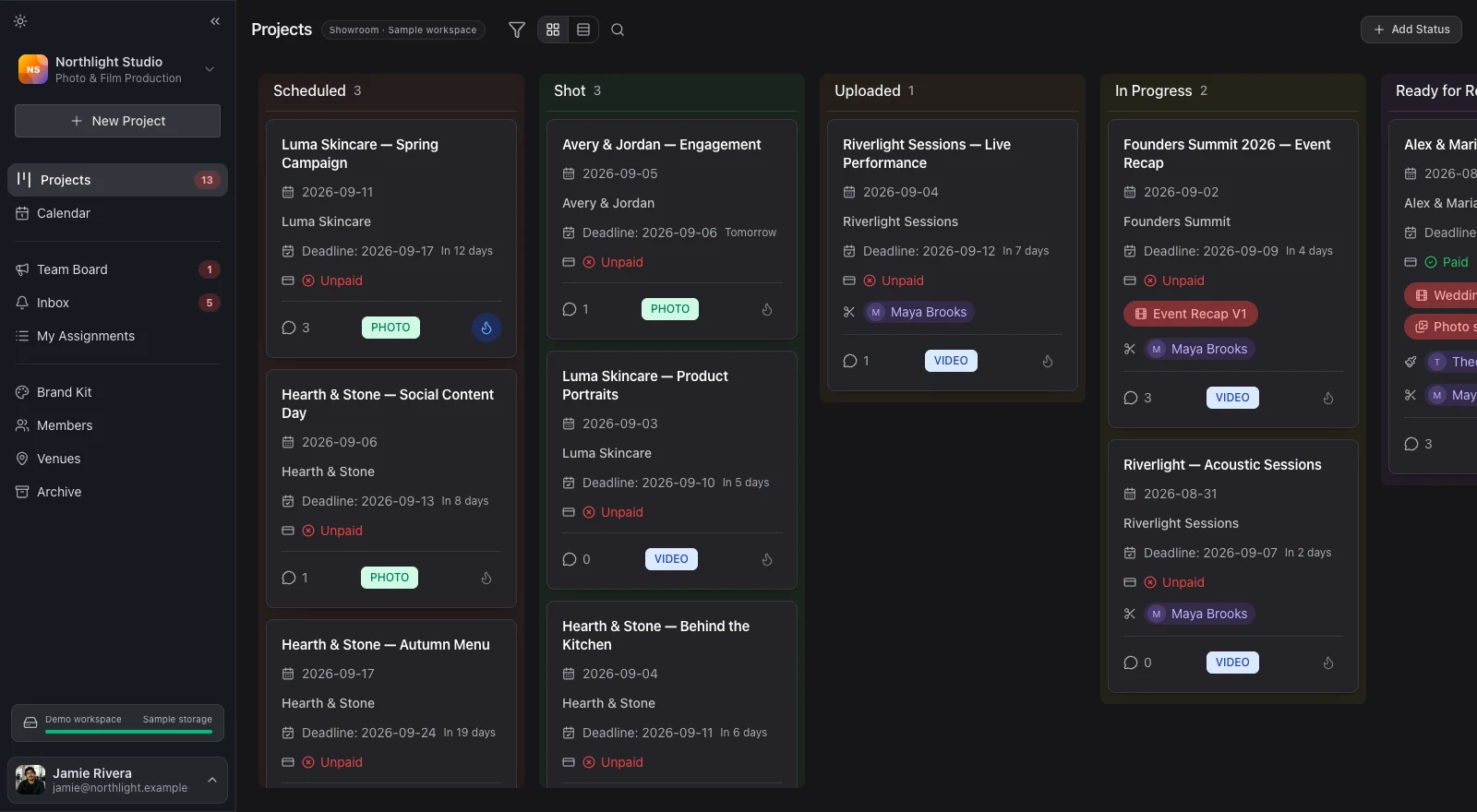
Every job on one board
The shoot date, the crew, the deadline and the media sit on one card, in the stage it is actually in. Everyone opens the same board and reads the same answer.
Corrections that point at something
A note is pinned to the second of the cut it belongs to, or drawn on the photo. Nobody has to describe which frame they mean, and nobody has to guess.
The freelancer works inside your studio
Invite a photographer, a videographer or an editor and the job appears in their My Assignments — under your plan, not theirs. The conversation stays beside the work.
- Photo and video
- Run either, or link one of each for the same shoot.
- Web, desktop, and mobile
- The same workspace on Windows and macOS, iPhone, and the web.
- Review on every plan
- Including Free. Plans differ by storage, people and traffic.
- Two projects free
- No card. The trial is inside the app when you want it.
The job is not the hard part. Keeping it in one place is.
Without a production workspace
- Your shoot dates live in one tool, your deadlines in another, and the media in a third.
- Corrections come back as sentences — the part near the end, the third photo — and somebody has to work out which frame they mean.
- The freelancer you brought in for one job gets the brief in a chat thread and asks you for the rest.
In FlowShot
- One project holds the date, the crew, the deadline, and the media for that job.
- A correction is drawn on the photo or pinned to the second of the cut it belongs to.
- The freelancer opens that job in My Assignments and works under your plan, not their own.
Every job, in the stage it is actually in.
Open a board of your own See a fictional studio already in motion- Stages you name
- Eight to start with. Rename them, add your own, hide the ones your studio does not use.
- Fields you choose
- A card shows what your studio tracks — package, deadline, payment, the draft — and hides the rest.
- Photo and video, linked
- One shoot can be two projects with separate crews, deadlines and review cycles, and one event between them.
Shot
2Emma & Tomás
Sofia & Mark
In Progress
2Rooftop apartment tour
Nadia & Peter
Ready for Review
2Ana & Léo
Café opening
Approved
2Clara & Jonas
Autumn portrait day
8 stages, out of the box.
Then it is your board. Counted from the stages a new workspace is created with — sign up and count them.
Stop relaying the job.
Start freeDo it once. FlowShot carries it forward.
Scroll through one production. Every turn advances the work — folders, dates, assignments, status and the edit — while your team stays focused on the job.
Explore integrationsProduction board
Summer weddings
Linked production
Ana & Léo
14 Aug 2026 · Wedding
Highlight film V2 Project advances only after processing finishes.
Marta Cut two beats earlier — we lose her look to camera.
New project
×- 01 Create the job once.
Ana & Léo, one linked photo + video production, one shoot date.
- 02 The workspace builds itself.
FlowShot creates the cloud folders and puts the dates on the calendar.
- 03 The right person hears about it.
Marta is assigned as video editor and gets an email and a push on her phone.
- 04 The board moves when the media is ready.
Processing finishes, then the project advances to Ready for Review.
- 05 The correction lands on the timeline.
The review note arrives in Premiere at 00:34.20 — without retyping it.
Nobody describes a moment in words again.
- Pinned to the second
- A comment carries the timecode it was written at, down to hundredths. Click it and the cut jumps there.
- Drawn on the frame
- 6 tools and 9 colours, over the picture rather than beside it.
- Approved in one place
- Approve, or send it back for changes. The decision and who made it stay on the version.
Marta · 0:34.20 Cut two beats earlier — we lose her look to camera.
Grade is warm here and cold in the next shot. Match to this one.
Music under the speech is too loud.
@ 0:34.20
DSC_0041
2 DSC_0042
DSC_0043
1 DSC_0047
DSC_0051
DSC_0052 Rev. 2
DSC_0058
3 DSC_0060
DSC_0063
DSC_0064
DSC_0071
DSC_0075 Rev. 3 A hundred and fifty frames, and the four that still need work.
- Rated and filtered
- Stars on the frame, and a filter that leaves only what still needs work.
- Comments where they belong
- The red badge on a thumbnail is the count of corrections still open on that photo.
- Revisions you can see
- A re-edited frame is marked as one, so nobody re-checks the ones that did not change.
Try the product story
Walk through a fictional studio already in motion.
No login. Everything you change is local to the tab and resets on refresh.
Choose where you want FlowShot to live.
Phone apps travel with the crew. The computer app keeps the full workspace on your desktop. Editor plugins bring review notes into the cut.
Review reaches the tools where the edit happens.
These install inside Adobe applications. They are not the Windows or macOS FlowShot desktop app.
Notes reach the editor without leaving Premiere.
- The client’s comments arrive on the timeline as markers, on the timecode they were written at.
- Export the sequence to the next review version without leaving the editor.
- It updates itself. Install once.
2 open
Cut two beats earlier — we lose her look to camera.
Grade is warm here and cold in the next shot.
Music under the speech is too loud.
Publish a set straight out of Lightroom.
A publish service that sends selects to FlowShot for review and brings corrections back beside the photographs. It is still in development; there is no download yet.
One email, the day it works. Nothing else.
Built by people who still shoot.
FlowShot comes out of a working production studio, not out of a product meeting. Every stage on the board is one somebody had to run on a Saturday.
Founder-built
Built by someone who ran a studio.
Alex spent 12 years in production and built FlowShot around the workflows his own team needed every day.
- Years in production
- 12+
- Weddings through our edit room
- 3,000+
Every plan has the whole workflow. Plans differ by size, not by feature.
Storage, how many people, and how much playback traffic. That is the whole difference between one plan and the next — review is on the Free plan too.
-
Review pages
Comments, drawings, ratings, and correction threads on photos; timestamped notes and frame drawings on video.
-
Cloud media upload
Upload photo sets and video cuts for review, with storage tracked per workspace.
-
Production board
Custom project stages, filters, priorities, deadlines, and a table view for dense schedules.
-
Crew and assignments
Assign photographers, videographers, editors, and assistants by role on each project.
-
Project communication
Keep project chat, mentions, files, and decisions beside the work they belong to.
-
Calendar and My Assignments
See production dates and personal assignments across every studio from one account.
-
Drive and Dropbox folders
Connect the project folders your studio already works from.
Simple studio pricing
A plan that grows at your studio’s pace.
Every paid plan gives you the complete FlowShot workflow. Choose only the capacity your team needs today — you can move up at any time.
Not sure where to start? Studio is the sweet spot for most growing teams.
Solo
For independentsFor one person and an editor, a couple of shoots a month
$15 /mo $12.50 /mo
Billed monthly · $150/year annually Billed $150/year · save $30
Storage
100 GB
Team
2 people
- Complete FlowShot workflow
- 1 organization
- Unlimited projects
- Premiere Pro panel and cloud folders
Studio
Most popularFor a studio with a steady weekly schedule
$29 /mo $24.17 /mo
Billed monthly · $290/year annually Billed $290/year · save $58
Storage
200 GB
Team
4 people
- Complete FlowShot workflow
- Up to 2 organizations
- Unlimited projects
- Premiere Pro panel and cloud folders
Pro
For busy studiosFor a busy studio keeping many projects in review
$59 /mo $49.17 /mo
Billed monthly · $590/year annually Billed $590/year · save $118
Storage
500 GB
Team
7 people
- Complete FlowShot workflow
- Up to 3 organizations
- Unlimited projects
- Premiere Pro panel and cloud folders
Max
Highest capacityFor a production company running a full crew
$89 /mo $74.17 /mo
Billed monthly · $890/year annually Billed $890/year · save $178
Storage
1 TB
Team
10 people
- Complete FlowShot workflow
- Up to 3 organizations
- Unlimited projects
- Premiere Pro panel and cloud folders
Free
No cardFor trying the real workflow, review included
- 2 GB · review media kept 30 days
- 1 organization · 2 active projects
- Photo & video review
$0 forever
Start freePrices exclude VAT and sales tax, which are added at checkout by our merchant of record. Plans are purchased on the web.
Before you move your workflow.
- Does FlowShot support both photo and video projects?
- Yes. Studios can run photo projects, video projects, or link one photo project and one video project for the same shoot. The linked projects share the event context while keeping separate crew, stages, deadlines, and review cycles.
- Can I use FlowShot in a browser, on a computer, and on my phone?
- Yes. FlowShot has a native desktop app for Windows and macOS, runs in a web browser, and the native iOS app is available on the App Store. On Android, you can use the mobile web app while the native Android app is still in development.
- How do the Free plan and the trial work?
- The Free plan gives you two projects and does not require a card. When you want to test photo and video review with a bigger team, you can activate one 7-day trial inside the app — also without a card. When the trial ends, the workspace returns to Free unless you choose a paid plan.
- What happens when I create a project?
- If your studio connects Google Drive or Dropbox, FlowShot can automatically create the project root using your naming rules and subfolder template. The folder stays attached to the project, ready for the assigned team.
- How does review work for photos and video?
- Photo review supports comments, drawings, ratings, filters, and a corrections view. Video review supports timestamped comments, replies, and frame drawings, so feedback stays attached to the exact image or moment.
- Is review included on every plan?
- Photo and video review is available on every plan, including Free. Paid plans differ only by how much storage, how many people, and how much playback traffic they include.
- Do freelancers need their own subscription?
- No. The workspace owner pays for the plan. Invited photographers, videographers, editors, and assistants work under that workspace subscription and see their work in My Assignments.
- Is there a plugin for Adobe Premiere Pro?
- Yes. FlowShot ships a panel that docks inside Premiere Pro: review comments arrive on the timeline as markers at the timecode they were written at, and you can export the sequence to the next review version without leaving the editor. The panel updates itself after the first install.
Ready to get production out of spreadsheets?
Start with two active projects and bring projects, assignments, and feedback into one production workspace.
Start freeFree plan · 2 projects · Review included · No credit card