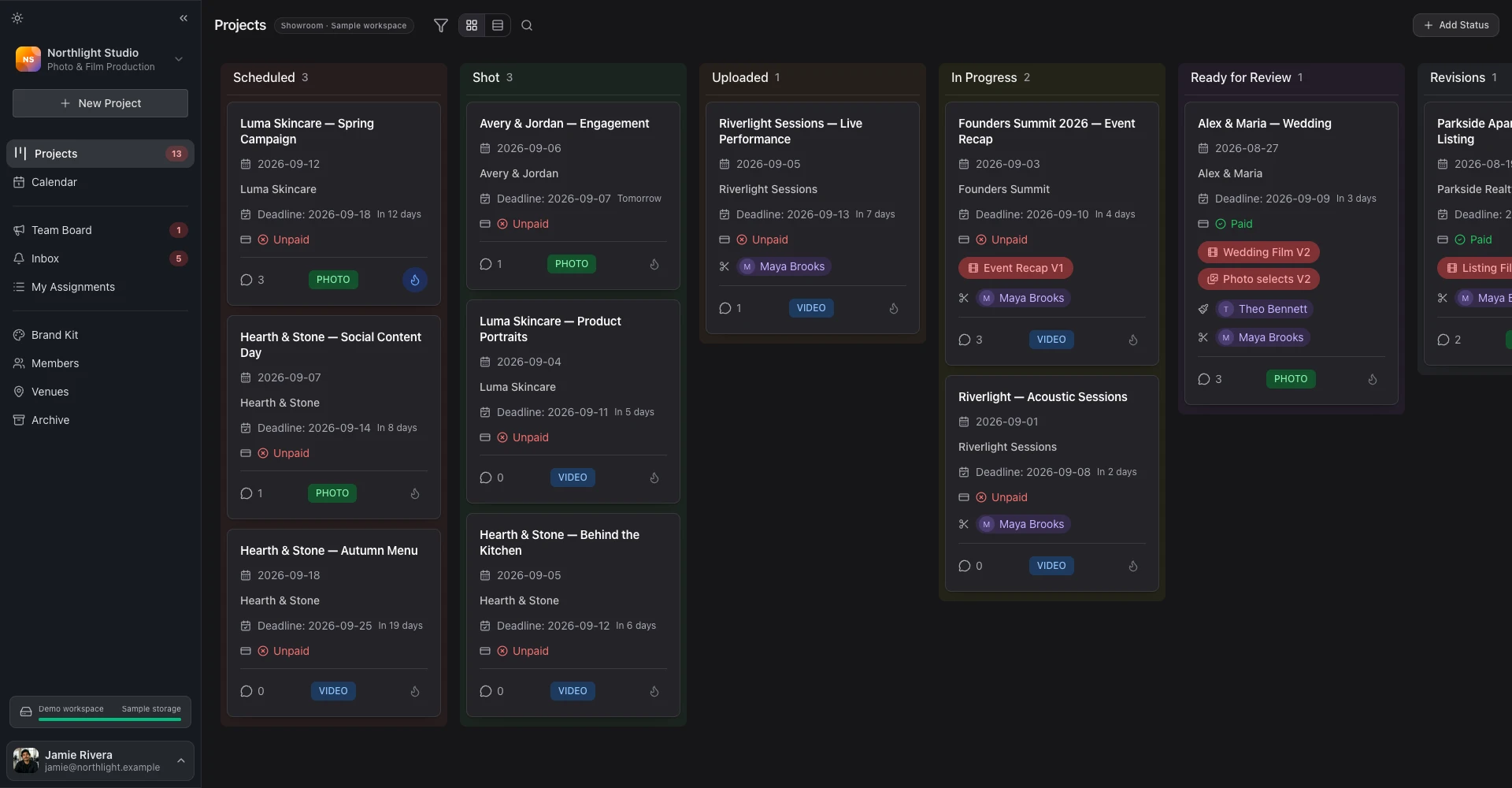
A Kanban built for production schedules, not generic to-do lists.
Drag projects through your pipeline. Assign crew by role. Link photo + video. Roll the year up onto one calendar. All on a board that doesn't choke at 1,000 cards.
Available on: Free (Kanban only) · Starter · Pro · Business (+ custom roles)
Uploaded
6Wedding · Anna & Lars
Jun 12
Wedding · Maya & Tom
Jun 16
Wedding · Sophie & Eli
Jun 20
In Progress
4Wedding · Anna & Lars
Jun 12
Wedding · Maya & Tom
Jun 16
Wedding · Sophie & Eli
Jun 20
Ready for Review
3Wedding · Anna & Lars
Jun 12
Wedding · Maya & Tom
Jun 16
Wedding · Sophie & Eli
Jun 20
The board mirrors your real pipeline.
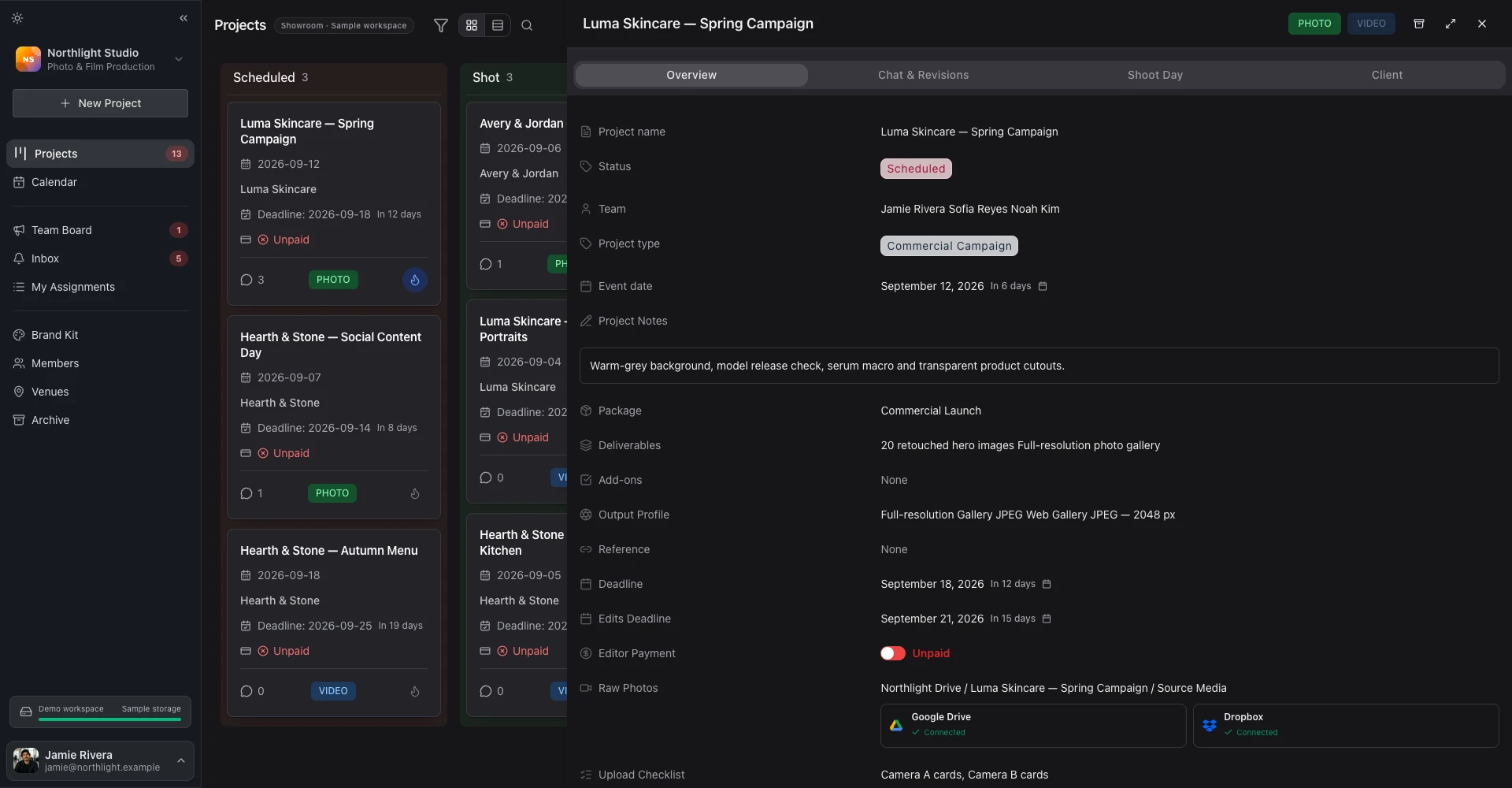
Generic project tools force your work into their categories. FlowShot lets you set up the exact stages your shoot moves through, name them, colour them, and pin custom fields right onto the card so the data you check most lives where you can see it.
- Custom statuses with colour per stage
- Custom fields: text, number, date, link, dropdown, multi-select
- Per-format pipelines: photo and video can run separate or shared
- Field visibility: choose what shows on the card vs the drawer
Status palette
Custom fields on the card
Drone permit
Approved
Travel km
420
Couple language
IT
Edit deadline
12 Jul
Assignment fields that filter to the right people.
Hire a freelance second-shooter for one wedding? They show up in the Photographer dropdown, but never in the Editor list, and never on a video shoot they're not on. Each role has a System Category that strict-filters the assignment dropdowns, so you stop assigning the wrong person.
- Built-in roles: Videographer, Video Editor, Photographer, Photo Editor, Assistant
- System Categories: Photo Crew, Video Crew, Photo Editors, Video Editors
- Custom roles you define yourself with field-level permissions
- My Tasks view: each crew member sees only their work
Assigned crew · Wedding · Anna & Lars
- VideographerMSMarta Schwarz
- Video EditorPKPavel Krug
- PhotographerLBLucia Bianchi
- Photo EditorDVDaniel Voss
- AssistantEHEva Holm
One client, one shoot, two formats. No duplication.
The wedding has a photo project and a video project. Same couple, same date, same venue. Link them and a single change to the date or venue updates both — your photo team and video team stay on the same page without forwarding screenshots in Slack.
- Single client record across linked formats
- Shared shoot date, venue, and timeline
- Independent crew per format
- One Brand Kit applied to both delivery galleries
Video
Anna & Lars · Wedding film
Crew: Marta, Pavel
Photo
Anna & Lars · Wedding album
Crew: Lucia, Daniel
Shared: client · date · venue · brand kit
A real project, end to end.
From inquiry to delivered, here's exactly what the board does for you.
- 1
Project hits the board
5 secondsNew project lands in the Scheduled column with the client name, event date, and primary format (photo or video) prefilled from your inquiry form or proposal.
- 2
Assign crew by role
10 secondsPick a Videographer, Video Editor, Photographer, Photo Editor, or Assistant from the role-filtered dropdown. The dropdown only shows team members in the matching System Category — no scrolling past 40 names.
- 3
Drag through your statuses
Per projectDrag the card from Scheduled → Shot → Uploaded → In Progress → Ready for Review → Revisions → Sent to Client → Approved. Statuses are fully custom: rename, reorder, recolour, or add new ones.
- 4
Link photo + video
5 secondsFor shoots that have both, link the photo project to the video project. Client info, event date, venue, and project name stay in sync. One client record, two formats.
- 5
See the year on one calendar
Always-onThe Calendar view rolls up every project on the board into a year grid, colour-coded by status. Toggle editor deadlines, client deadlines, and team events on or off.
Common questions about the board.
- Can I customize the Kanban statuses in FlowShot project management?
- Yes. The eight seed statuses (Scheduled, Shot, Uploaded, In Progress, Ready for Review, Revisions, Sent to Client, Approved) are fully editable: change the label, the colour, the order, or add new statuses.
- How many projects can FlowShot's Kanban board handle at once?
- We virtualise the board, so it stays smooth past 1,000 cards on a single status. Studios with very large archives use the Archived status (which lazy-loads) and filters by year on the calendar.
- Can different team members see different projects?
- Yes. The "My Tasks" page (/my-assignments) shows every project a team member is assigned to across all studios they work with, and Custom Roles (Business plan) let you scope what each role can see and edit at the field level.
- Do photo and video projects share the same board?
- By default, yes. The Kanban shows all projects with a tab to filter by format. Photo and video teams can each focus on their own view through the format filter.
- Are there custom fields beyond the built-in ones?
- Yes. Add any custom field (text, number, date, link, dropdown, multi-select) and choose whether it shows on the Kanban card, the project drawer, or both.
Works with the rest of FlowShot.
Client portal →
Every project on the board has its own portal (proposals, contracts, invoices, delivery) under your domain.
Tour moduleVideo review →
Cards in "Ready for Review" jump straight into the timestamped video review surface with frame drawings and version stacking.
Tour modulePhoto delivery →
When the card hits Delivered, the gallery is one click away: branded, password-protected, on your domain.
Tour moduleReplace your Trello + spreadsheet + group chat.
Free for your first 3 projects per month. Move your real pipeline in. See if a board built for shoots beats a generic one.