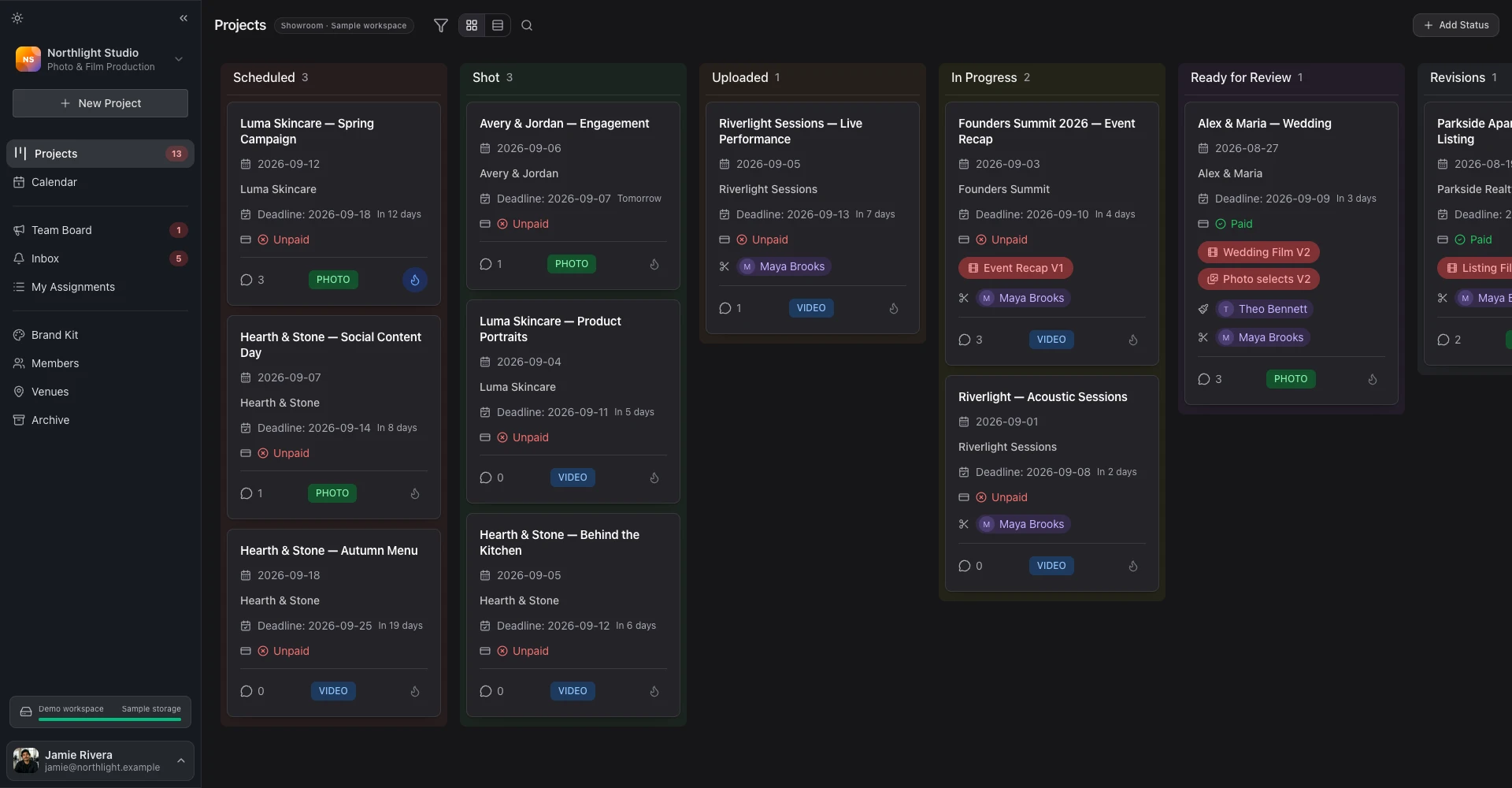
Event production, end-to-end — from proposal to multi-camera wrap.
Run multi-day events with multiple cameras, crew rotations, and same-day deliverables. FlowShot keeps pre-prod, on-site, and post-prod in one workspace. Webhooks push proposal, contract, and invoice events into your client's stack automatically.
- Multi-camera crew rotations
- Same-day delivery galleries
- HMAC-signed webhooks
Crew assigned
Webhook fired
200 OK · 412msPOST /webhooks/flowshot
event: invoice.paid
How event production teams run multi-day events end-to-end.
Pitch, pre-prod, crew, on-site, same-day delivery, post — FlowShot handles each piece.
- 01 Pitch
Send a proposal the production lead can actually sign on their phone.
Corporate events don't have time for PDF attachments. Send a branded proposal link with package tiers, add-ons (extra cameras, extra days, livestream), and a signable contract in the same flow. The production lead approves from their phone — no printing, no scanning, no waiting on IT.
- Package tiers for 1-day / 2-day / conference events
- Add-ons: extra camera, jib, drone, livestream feed
- DocuSeal signature flow on the production lead's phone
- Retainer invoice created on approval — studio marks paid when deposit clears
- 02 Pre-prod
One project for the whole event.
A multi-day conference is one project on the kanban with custom statuses for each phase. Your team reads the same brief, the client sees one contract and one invoice.
- Client questionnaire for shot priorities, keynote speakers, VIPs
- Venue and contact details linked to the project
- Equipment checklist on the project drawer
- Custom kanban statuses for pitch → on-site → wrap
- 03 Crew
Assign your videographers, drone, and audio in one place.
Assign crew to roles per project — videographer, second shooter, drone operator, assistant. Each crew member gets a Telegram notification when they are added or when status changes.
- Custom roles to match your org chart
- Crew assignments by role and format
- Telegram notifications on assignment and status changes
- Team calendar shows every assigned shoot
- 04 On-site
Your crew opens the project on their phone.
Crew see the project details on mobile: call time, venue, contacts, equipment list, shot priorities. The data they need to do the job, on whatever device they have on them.
- Mobile-optimised project view
- Project chat for crew coordination during the shoot
- Telegram notifications on status changes
- Firestore offline persistence so notes survive lost signal
- 05 Same-day delivery
Highlight reels go live before the after-party.
Upload the highlight on-site, publish a delivery page, share the branded link the same day. Your client's marketing team can route or download from there immediately.
- Branded delivery page with per-section download toggle
- Password-gated delivery with expiry
- Custom domain for all client-facing pages on Business plan
- Multiple delivery pages per project for staged drops
- 06 Post
Webhooks push studio events into your client's stack.
When the contract is signed, the invoice is created, or the invoice is marked paid, a webhook fires into Zapier, Make, n8n, or your own endpoint. Route into your accounting tool, your client's media library, or your CRM without manual hand-offs.
- Six HMAC-SHA256 signed events: proposal.submitted, proposal.approved, proposal.declined, contract.signed, invoice.created, invoice.paid
- Point the webhook at Zapier, Make, n8n, or your own endpoint
- Retry + dead-letter queue for failed deliveries
- Per-event webhook logs for audit
Built for multi-day, multi-camera, multi-deliverable work.
One project per event
Run a multi-day conference as one project on the kanban — one contract, one invoice, one client portal — instead of three bookings pretending to be related.
Learn moreCustom crew roles
Custom roles to match your org chart — videographer, drone, audio, client lead, anything you need. Assign by role and format in one click.
Learn moreSame-day delivery galleries
Publish today's highlight within an hour of the event ending. Branded delivery URL goes to the client's marketing team immediately.
Learn moreOutbound webhooks
Six HMAC-signed events including contract.signed, invoice.created, invoice.paid. Push into your client's DAM, your accounting tool, or Zapier.
Learn moreReusable contract templates
Reusable contract templates with multi-party e-signatures built in — no separate DocuSign account or per-envelope fees.
Learn moreInvoicing — bank transfer or any method
Send an invoice document; the client pays out-of-band (bank transfer, PayPal, or whatever they prefer). Mark it paid in FlowShot. Corporate clients who need a purchase-order flow work the same way.
Learn moreCommon questions from production teams.
- How do you manage multi-camera, multi-day event production without spreadsheets?
- A multi-day event is one project on the kanban with custom statuses for each phase. Crew are assigned by role to the project, the equipment checklist lists the gear, and the questionnaire captures shot priorities. The project rolls up to one contract, one invoice, and one client-facing portal.
- How do same-day deliveries work?
- Upload the highlight cut from the venue, click Publish, and it is live on your client's branded delivery page within minutes. The delivery URL is shareable immediately; your client's marketing team can route or download from there.
- Can we push deliverables into our client's DAM automatically?
- Yes. FlowShot fires HMAC-SHA256-signed outbound webhooks on six event types: proposal.submitted, proposal.approved, proposal.declined, contract.signed, invoice.created, and invoice.paid. Point them at Zapier, Make, n8n, or your own endpoint to route events into your accounting tool, your client's media library, or your CRM. There is a dead-letter queue for failed deliveries and per-event audit logs. Webhooks are available on the Business plan.
- How does billing work for corporate clients who need bank transfer?
- FlowShot invoices are documents. You send them, the client pays via whatever method you agreed (bank transfer, PayPal, or your normal billing flow). You mark it paid in FlowShot when the money clears. That mark-as-paid action triggers the same downstream webhooks regardless of how the client actually paid.
- Can multiple production leads access the same event?
- Yes. Business plan includes 7 base seats and scales to 20 seats (extra at $5/seat/month). Permissions can be set per team member: full access to all projects, or restricted to projects they are assigned to. Custom roles match your actual org chart on every plan.
- How does your pricing work for a 10-person production company?
- Business plan at $89/month includes 7 base seats (up to 20 with $5/seat add-ons), outbound webhooks, and a custom domain. For production companies above 20 seats or with custom requirements, contact sales.
- Can we white-label the delivery page to our client's brand?
- Yes. On the Business plan, point a subdomain (e.g. portal.client-brand.com) at FlowShot in DNS. All client-facing pages — delivery, questionnaire, contract, portal home — are served under that domain with the studio's logo. You can also host your own agency domain if the client prefers neutral branding.
Wire your events into one system, not ten tabs.
14-day free trial on every plan. Upgrade to Business when you want webhooks and advanced role permissions.