

The best video review tool depends on what happens around the cut. Frame.io suits Adobe-heavy creative teams, Wipster keeps review focused, Dropbox Replay fits existing Dropbox workflows, and Filestage or Ziflow handle formal approvals. FlowShot fits small photo and video studios that want review connected to crew, projects and final client delivery.
Video review tools at a glance
| Tool | Best fit | Pricing shape checked September 2026 |
|---|---|---|
| FlowShot | Photo and video studios managing shoots, editors and delivery | Free plan; paid plans from $25/month for 2 people and 200 GB |
| Frame.io | Adobe-centered teams and larger creative pipelines | Free; Pro from $15/member/month |
| Wipster | Teams that want a focused review-and-approval product | Light from $9.95/month; Team from $19.95/user/month annually |
| Dropbox Replay | Teams already storing work in Dropbox | Limited Basic access; add-on from $10/user/month annually, plus an eligible Dropbox plan |
| Filestage | Agencies reviewing video, designs, documents and web content | Free; paid plans from $199/month |
| Ziflow | Multi-stage approvals across many file types | Free; paid plans from $199/month |
| Vimeo | Creators who also need video hosting and distribution | Review features vary by Vimeo plan |
Prices are useful only after the workflow fits. A $10 add-on is expensive if the editor still copies comments into another system; a higher plan can be cheaper if it replaces that handoff.
What a video review tool should do
A video review tool gives each cut its own browser page. A reviewer pauses on a frame, writes a comment, and the tool attaches the note to that moment. The editor receives a list of actionable changes instead of searching through email, chat and screenshots.
At minimum, test these six things:
- Frame-accurate comments. A note must stay attached to the intended moment after playback resumes.
- Visual annotations. Reviewers should be able to point to a crop, object or graphics error on the frame.
- Version history. V1 comments must stay with V1 when V2 is uploaded.
- Reviewer access. Check whether clients or occasional reviewers need accounts or paid seats.
- Editing integration. The editor should be able to read or resolve feedback without rebuilding the list by hand.
- A clear end to the round. Approval states, deadlines or resolved comments should make it obvious when a cut can move on.
This is different from video editing software. The cut still happens in Premiere Pro, DaVinci Resolve, Final Cut Pro or another NLE. The review tool organizes decisions about that cut.
Which video review tool fits your studio?
FlowShot: best when review is part of a studio project
FlowShot places video review inside the same workspace as the production board, crew assignments, tasks, calendar and project chat. Comments are pinned to time, reviewers can draw on a frame, versions remain connected, and two versions can be compared side by side.
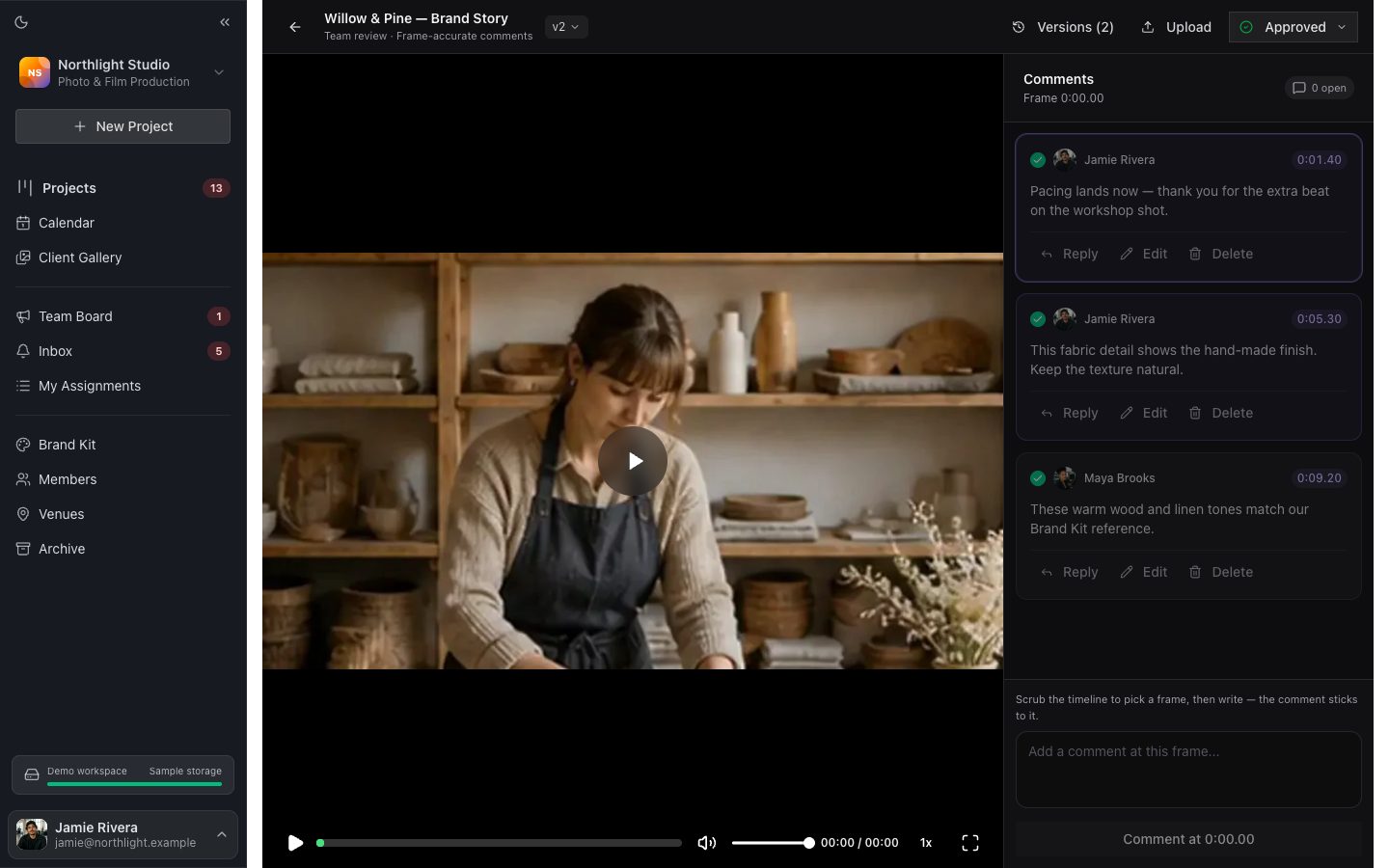 The cut, its version, approval state and comment queue stay on one review page.
This structure fits a wedding or commercial studio where the owner must answer more than “is the cut approved?” They also need to know who edits it, when it is due and which shoot it belongs to.
After internal review, the final photos and films can move to a private Client Gallery. Review Pages remain the team’s working surface; Client Gallery is the client-facing delivery with viewing, favorites, notes and original downloads without a FlowShot account.
 The finished film has its own page in the same gallery as the photos.
FlowShot Free includes review and Client Gallery for one person, two projects and 5 GB. Paid plans increase storage and people. See FlowShot pricing for current limits.
Frame.io: best for Adobe-heavy creative teams
Frame.io combines frame-accurate and range-based comments, annotations, version stacks and a comparison viewer. Its integrations and Camera to Cloud workflow make it the deepest choice here for large video pipelines. External reviewers can use share links without buying a member seat.
For a small studio, check whether those production features justify per-member pricing and a separate system for the shoot schedule, crew and client delivery.
Wipster: best for a focused review workflow
Wipster concentrates on sharing media, collecting comments, comparing versions and managing approval. Its Light plan is designed for individuals and occasional use; Team adds more storage, branding and team-only comments. It is a sensible shortlist option when review is the whole problem you need to solve.
Dropbox Replay: best for teams already in Dropbox
Dropbox Replay supports live review, comments, markup, approvals and integrations with major editing applications. Uploaded files count against Dropbox storage, and the full Replay add-on requires an eligible Dropbox plan. The fit is strongest when the source files and team already live in Dropbox.
Filestage: best for mixed creative assets and stakeholder groups
Filestage reviews video, images, documents, websites and audio in one system. It supports separate internal and external reviewer groups, versions, annotations and account-free reviewers. Agencies with formal client approval stages get more value from it than a two-person studio reviewing only video.
Ziflow: best for multi-stage approval workflows
Ziflow handles more than video and emphasizes proof stages, reviewer decisions, audit trails and workflow automation. Its free plan is useful for evaluating the proofing experience; paid plans are positioned for agencies and larger teams with repeatable approval routes.
Vimeo: best when review and hosting belong together
Vimeo combines video hosting and distribution with collaboration features on its current plan family. It belongs on the shortlist when the approved video will also live on Vimeo. Confirm the exact review features in the plan you are considering because storage and collaboration allowances vary.
How to test a video review tool before paying
Use one real cut and one real reviewer who is not an editor. A polished demo hides the frictions that cost time.
- Upload a representative 4K file and test playback on a phone and a slower connection.
- Ask the reviewer to leave one timed comment, one drawing and one approval decision without instructions.
- Upload V2 and check whether the V1 notes remain understandable.
- Give the editor the comment list and watch whether anything must be copied into chat or a task manager.
- Invite an outside reviewer and check whether an account or paid seat is required.
- Calculate the bill using the busiest month: team members, reviewers, storage and any required base subscription.
The winning tool is the one that removes a handoff. If the studio owner still reads every client note and rewrites it for the editor, the software has merely moved the inbox.
Turn feedback into editing instructions
A useful review note answers where, what and, when it changes the creative decision, why.
- “01:24 — hold this close-up two seconds longer so the reaction lands before the music change” is actionable.
- “The shot near the middle feels rushed” makes the editor search for the problem.
Let the player stamp the time, keep one change per comment and use a drawing when the change is spatial. For a fuller process, see how to stop relaying revisions to a freelance editor.
One version should equal one review round. Set a deadline, collect the notes, send the cut back once and close resolved comments before V2 begins. This keeps the review connected to the video project schedule instead of turning it into a stream of interruptions.
Video review vs project management vs client delivery
These are three different jobs:
| Job | What it holds | FlowShot surface |
|---|---|---|
| Project management | Dates, crew, tasks, files and production status | Project board, calendar, assignments and chat |
| Internal review | Versions, timestamped comments, drawings and approval | Review Pages |
| Client delivery | Approved photos and films, favorites, notes and downloads | Client Gallery |
A standalone review tool may solve only the middle row. That can be exactly right. A small studio should still count the handoffs into and out of it before choosing.
FAQ
What is the best video review tool for a small studio?
Choose by the work surrounding review. Frame.io fits Adobe-centered video teams, Wipster is a focused review product, Dropbox Replay fits an existing Dropbox workflow, and FlowShot fits photo and video studios that also need projects, crew and client delivery. Test the leading two with the same real cut.
Is there a free video review tool?
Yes. FlowShot, Frame.io, Filestage and Ziflow list free plans, while Dropbox Replay offers limited access on Basic. Free limits differ by storage, projects, files, history and users, so confirm that the plan can hold a complete review round before adopting it.
Do clients need an account to review a video?
It depends on the product and sharing mode. Frame.io says external reviewers can open share links without signing up, and Filestage supports account-free reviewers. For internal FlowShot Review Pages, invited studio members sign in; the separate Client Gallery lets clients view and download delivered films without a FlowShot account.
Can a video review tool replace project management software?
Usually not. A review tool organizes comments and approvals on media. Project management tracks the shoot, crew, due dates, tasks and production status. FlowShot combines both for small photo and video studios; specialist review tools often integrate with a separate project manager.
What happens to comments when a new version is uploaded?
A capable review tool keeps comments attached to the version where they were made. The editor should be able to open V1, understand its notes and compare it with V2 without treating old feedback as a new request.
Competitor features and prices were checked against the providers’ official public pages on September 29, 2026. Plans change; verify current terms before buying.
Updated
See the workflow in FlowShot ↗