
Video review and collaboration is the process of collecting feedback on a cut, tying every note to its moment and version, and turning the approved notes into one editing queue. The goal is simple: the editor should know what to change, the reviewer should know what remains open, and the studio should know which version can move to delivery.
Email can discuss a video. Cloud storage can hold it. A review workflow has to preserve the relationship between the cut, the comments, the people and the decision.
What a complete video review workflow contains
A useful system covers six jobs:
- A reviewable version. Everyone watches the same V1 rather than separate downloads.
- Timestamped feedback. Each note belongs to the relevant moment.
- Visual context. Drawings identify crops, objects and graphics changes.
- Version history. V1 notes remain on V1 after V2 is uploaded.
- A closed round. The editor receives one consolidated list.
- A recorded decision. Approval belongs to the version that earned it.
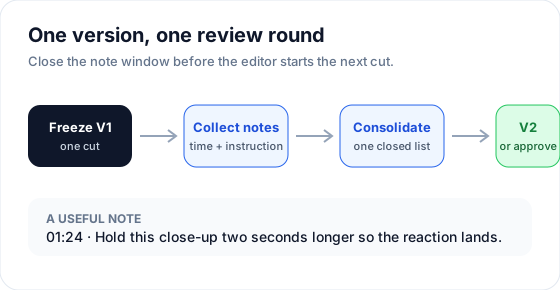 A review round ends before the next edit begins.
This differs from collaborative editing. Premiere Pro, DaVinci Resolve or Final Cut Pro still holds the timeline and media. The review layer organizes decisions about the exported cut.
Put feedback on the cut
A note such as “the middle feels slow” makes the editor find and interpret the problem. A useful note removes that search:
01:24 — hold this close-up two seconds longer so the reaction lands before the music change.
The timestamp answers where. The instruction answers what. The reason explains why the creative timing matters.
Use a drawing when the change is spatial: a crop, a title position, an object to remove or an area to retouch. Keep text with the drawing so the mark does not become another riddle.
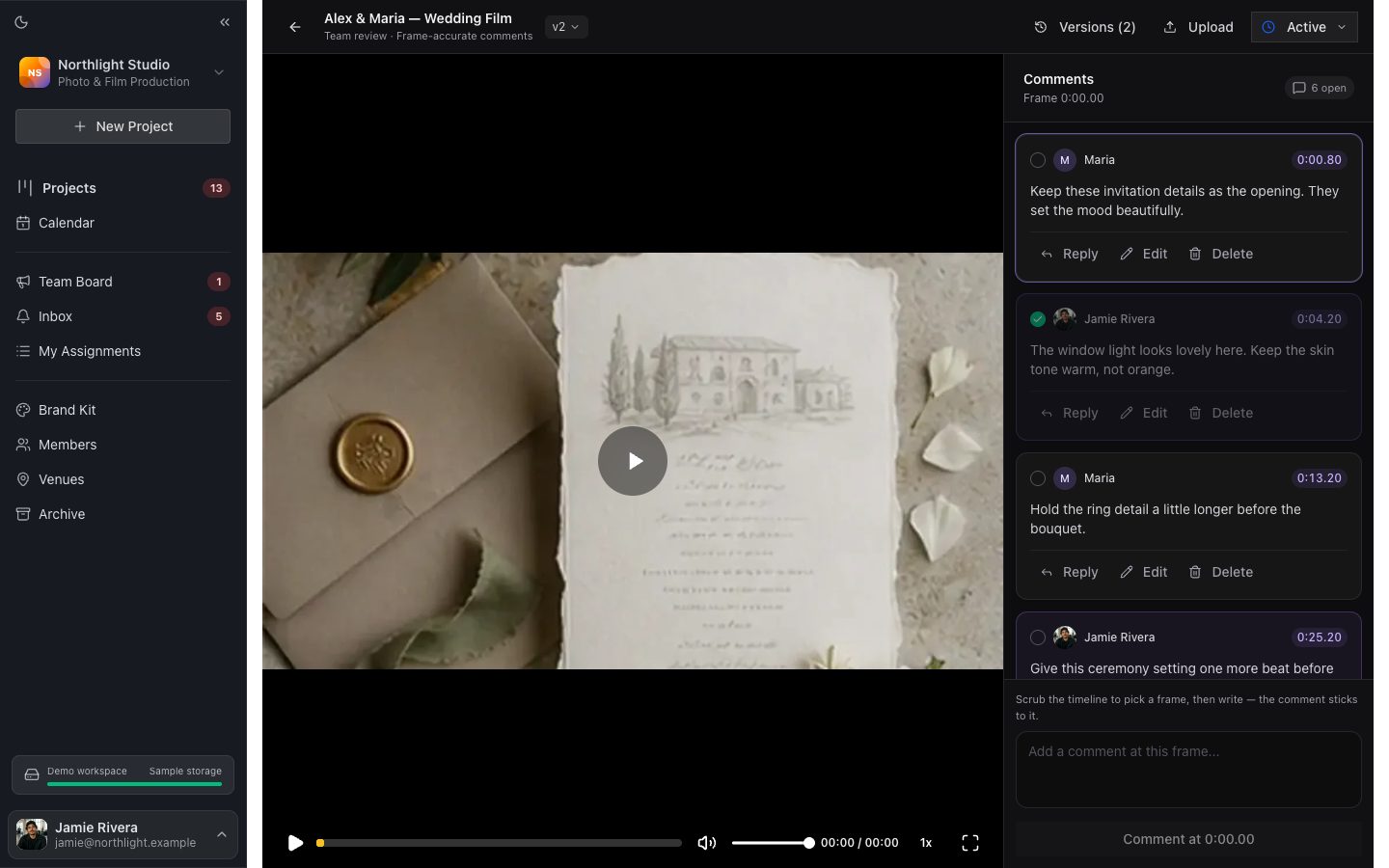 The cut and its comment queue share one review surface.
Keep each round attached to one version
Version history is more than a stack of files. It should answer:
- Which comments were written on V1?
- Which were resolved before V2?
- Which cut is currently waiting for review?
- Which version was approved?
Uploading a new file as a separate review breaks that chain. Upload it as the next version of the same deliverable. Comments from earlier versions should remain readable without pretending their old timestamps belong to the new edit.
When comparison matters, open two versions side by side. The reviewer can verify a color, timing or shot change without scrubbing two unrelated browser tabs.
Consolidate before the editor starts
Multiple people can review a cut, but the editor should receive one decision. Assign a producer, owner or creative lead to:
- resolve contradictory requests;
- combine duplicate notes;
- reject changes outside the agreed scope;
- clarify vague instructions;
- close the feedback window;
- assign the next version and deadline.
This removes transcription while preserving creative control. The producer stops copying notes into messages and spends their time deciding which notes should become work.
For concrete examples, see how to give feedback to a video editor.
Bring comments into the editor’s workspace
The browser is convenient for reviewers. The editor spends the day in the NLE. A review integration should reduce the trip between them.
FlowShot’s Premiere Pro panel shows the review feed inside Premiere. A comment left in the browser remains tied to its timecode and can be read where the cut is being changed.
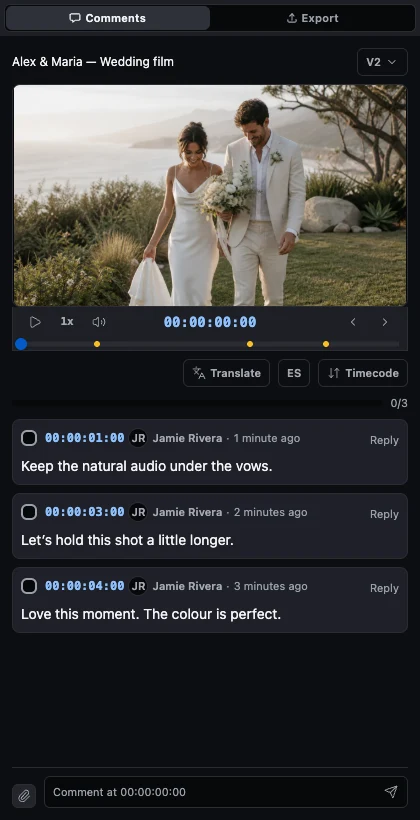 Frame-specific comments remain available inside Premiere Pro.
An integration does not need to edit the sequence automatically to be useful. Its first job is to preserve the comment, version and timecode without requiring another copied list.
Connect the review to the production project
A review page can say what is wrong with a cut. It cannot by itself answer who owns the work, when it is due or which client project it belongs to.
The production layer should connect:
- the project and event date;
- assigned videographer and editor;
- storage or footage links;
- deliverables and current versions;
- internal deadlines;
- project status;
- final client delivery.
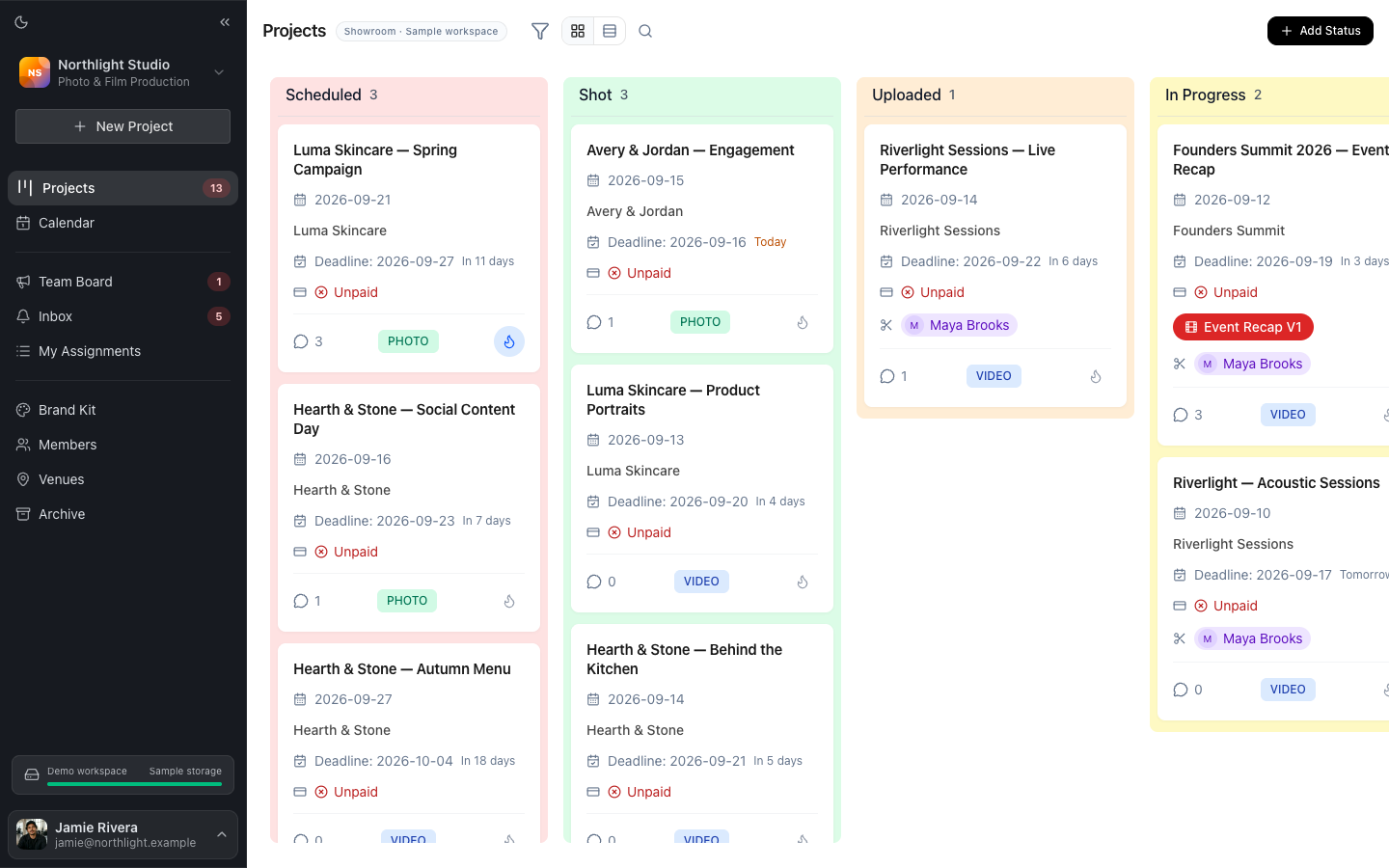 The board shows which shoots are waiting for review, revisions or delivery.
This is why a studio may need project management around the review tool. The review surface is deep on one cut; the board has to show every active shoot without opening each cut.
Separate internal review from client delivery
Internal review is a working surface for the studio’s team. It may contain technical notes, rejected versions and unfinished decisions. Client delivery should present only the approved photos and films.
In FlowShot these are separate surfaces:
| Job | Surface | Audience |
|---|---|---|
| Production tracking | project board, assignments and calendar | studio team |
| Internal photo and video review | Review Pages | invited workspace members |
| Finished delivery | Client Gallery | client, without a FlowShot account |
After approval, the studio can publish the finished film to a private Client Gallery beside the photos. The client sees the result rather than the internal comment history.
How to test video review software
Use one real export and one real reviewer who is not an editor. Then check:
- Can the reviewer leave a timed comment and drawing without instructions?
- Does V2 preserve the history of V1?
- Can the editor distinguish open, resolved and approved work?
- Does an external reviewer need an account or paid seat?
- Can comments reach the NLE or a clear editing queue?
- Can the studio see the review status beside every other project?
The best test is a complete round, not a ten-second demo file. A tool can have every feature on a pricing page and still create another handoff in the studio’s actual process.
For current products and pricing shapes, see Best Video Review Tools for Small Studios.
FAQ
What does video review and collaboration mean?
It means watching a shared cut, leaving comments at specific moments, keeping notes tied to their version and recording the decision that ends the round. Collaboration includes the people and process around the feedback, not only the comment tool.
What is the difference between video collaboration and collaborative editing?
Video collaboration can include review, approvals, files, chat and project status. Collaborative editing usually means more than one editor working in or around the editing timeline. A studio can use review collaboration while the editor continues cutting in a desktop NLE.
Do comments survive when a new version is uploaded?
They should. In FlowShot, each version keeps its own comment thread and timecodes. The next version becomes the current cut without overwriting the history of the previous round.
Who should approve a video review round?
Assign one accountable producer, owner or creative lead. Several people may leave notes, but one person should resolve conflicts, close the list and decide whether the version advances.
Can clients use the same page as the internal team?
They can in products designed for external proofing, but many studios benefit from separating internal work from client delivery. FlowShot uses Review Pages for signed-in team members and Client Gallery for finished photo and film delivery.
Updated
See the workflow in FlowShot ↗