Photography workflow automation should remove repeated copying between a booking, project, calendar, storage and delivery. Start with actions that have an unambiguous trigger and result: create the standard folders, add known dates, notify the assigned person or prepare a delivery after approval.
Do not automate a decision the studio cannot describe. “Use AI to manage the workflow” is not a process. “When a booked project is created, make its standard folders and place the shoot date on the team calendar” is.
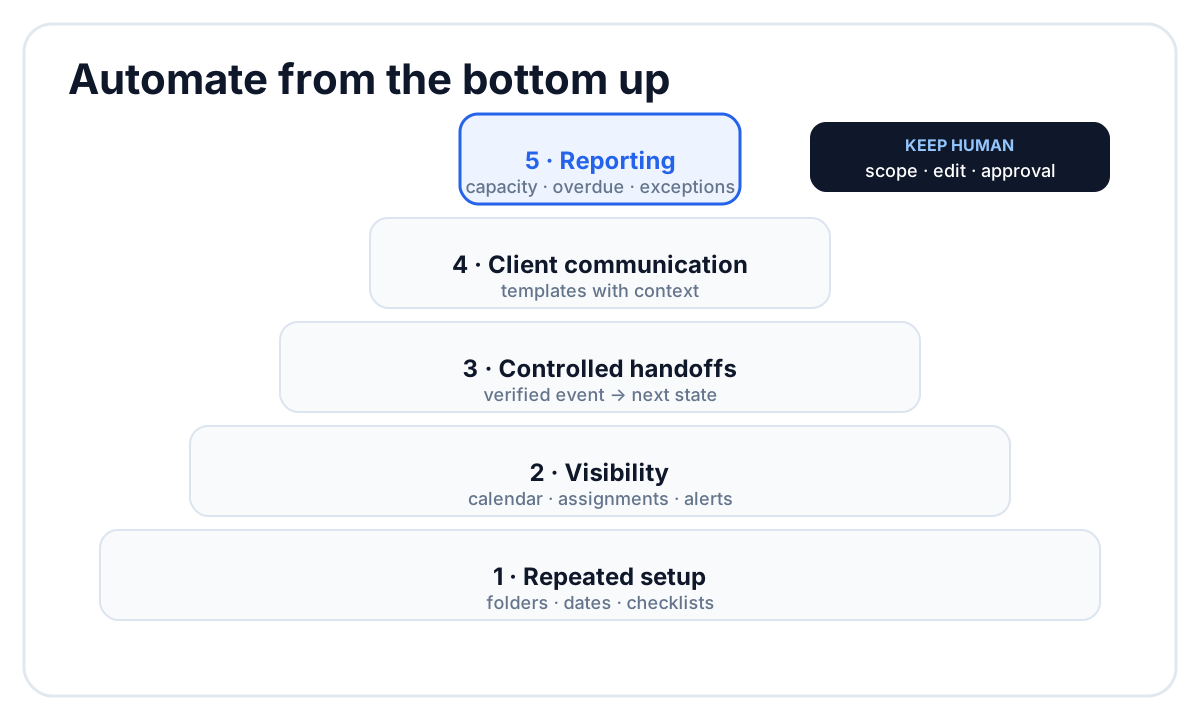 Automate deterministic preparation first; keep creative and client decisions visible.
What to automate first
Use this order:
- Repeated setup — folders, checklists, project fields and standard dates.
- Visibility — calendar entries, assignments and notifications.
- Controlled handoffs — status changes after a verified event.
- Client communication — templated messages with human review where context matters.
- Reporting — overdue work, missing owners and capacity.
Each automation should save a manual step without creating a second source of truth.
1. Project creation after booking
When a booking becomes definite, create the production project with the client, shoot date, format, package and initial owner. If the booking contains photography and videography with different teams, create linked projects so each can move through its own production stages.
Do not create full production records for every unqualified inquiry. That clutters the board and makes “booked” statistics unreliable.
2. Folder structure
A project folder is a good automation target because its names and subfolders are known before the files arrive. A template might create:
Client_Project/
├── Photo/
│   ├── RAW/
│   ├── Selects/
│   └── Exports/
└── Video/
    ├── RAW/
    ├── Project/
    └── Exports/
The automation should link the created folder back to the project. Otherwise it saves a setup step and leaves the team searching for the result.
3. Dates and calendar visibility
Add the shoot date, internal deadlines and client delivery date to the production calendar from project fields. External calendars can display selected dates, but edits should originate from the project that owns the promise.
Avoid two-way rules unless the conflict behavior is explicit. If someone drags a date in a personal calendar, should that change the contractual delivery deadline? Usually it should not.
4. Crew assignment notifications
When the producer assigns a photographer, videographer or editor, notify that person with the project, role and date. The notification should lead to the project rather than paste the whole brief into a message that will become stale.
An assignment automation works only if the role is explicit. “Added to project” does not tell the recipient whether they are leading the shoot or editing afterward.
5. Status changes from verified events
Useful status automation relies on a real event:
- a required file finished uploading;
- a review version finished processing;
- every required task is complete;
- approval was recorded;
- the delivery was published.
Uploading footage can make a project ready for the next stage, but only when the rule describes what “complete” means. One proxy arriving should not move a multi-camera wedding into editing.
6. Questionnaires and planning
Automatically preparing a standard questionnaire is useful. Automatically treating every response as a final brief is risky. The producer should review answers, resolve contradictions and publish the confirmed plan.
Use templates for recurring questions and conditional follow-ups. Keep manual control over the send date and any reminder until the business has a stable cadence. Our wedding photography questionnaire shows which answers drive actual planning decisions.
7. Review and delivery
Automate preparation around approval, not the approval itself. A studio can generate a delivery checklist or make approved media available to the gallery after a clear action. It should not infer creative approval merely because an export exists.
A safe sequence is:
- editor uploads a review version;
- approver resolves the comment queue;
- approver records approval;
- the producer adds the approved media to the Client Gallery;
- the producer verifies the client message.
What should remain human
Keep a person responsible for:
- accepting the job and scope;
- resolving conflicting client answers;
- choosing the creative edit;
- deciding whether corrections are in scope;
- approving the final set or film;
- handling sensitive client communication;
- changing a promised deadline.
Automation can surface the decision and record its consequence. It should not make the decision invisible.
Measure whether an automation works
For each rule, record:
| Measure | Question |
|---|---|
| Time saved | Which manual steps disappeared? |
| Error rate | Did missing or duplicate records decrease? |
| Exceptions | How often did a person undo the result? |
| Latency | Did the next owner start sooner? |
| Trust | Does the team believe the current status? |
An automation that saves clicks but creates status corrections is negative value.
How FlowShot supports photography workflow automation
FlowShot connects projects, assignments, storage, calendar, review and Client Gallery. The organization can use standard project structures, automatic Google Drive or Dropbox folders on paid plans, project and deadline visibility, assignment notifications and optional status rules (when a video finishes processing, when the team confirms all uploads, or when every review item is approved). Google Calendar can display selected FlowShot dates and team events on every plan, Free included; Apple Calendar and other compatible apps can subscribe through a private feed. On Solo and up, a CRM booking creates the project with the client, date and venue already filled in.
The complete photography workflow should be clear before automation is added. Start with one project type, measure the handoffs and expand only after the team trusts the state.
FAQ
What is photography workflow automation?
It is the use of rules and templates to perform repeatable operational steps such as creating folders, adding dates, notifying assigned crew and preparing delivery.
What should photographers automate first?
Start with standard project setup, folder creation, calendar visibility and assignment notifications. These steps have clear triggers and are easy to verify.
Should client emails be fully automated?
Routine confirmations and reminders can be automated when the context is stable. Messages involving scope, delays, conflict or creative judgment should be reviewed by a person.
Can automation choose when a gallery is ready?
It can move the project to a status you choose after an explicit approval event, while adding the photos to a Client Gallery stays a deliberate step. Creative readiness should remain a recorded human decision rather than an inference from the newest export.
How do I avoid broken automations?
Give every rule a clear trigger, result, owner and exception path. Review how often people reverse the result and remove rules that reduce trust in project status.